Adjust computer's gamma settings
Gamma Panel is a personalization tool developed by Stars.Benchmark.pl to easily modify your Windows desktop's gamma settings. With this software solution, you no longer need to suffer from the tedious work of pressing a lot of buttons just to simply access your screen’s internal setting.
Top Recommended Alternative

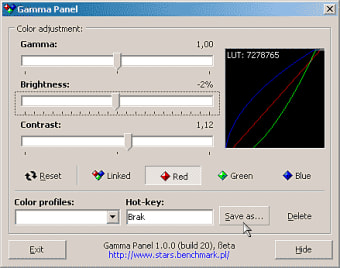
Here, the process is made easy and seamless so that you’ll be able to adjust your screen’s brightness, modify the gamma settings, and select the right contrast of the screen in real-time using a pre-defined hotkey. Just like f.lux and ClickMonitorDDC, this can be downloaded free-of-charge as well.
Change your screen’s settings with ease
This lightweight tool is unobtrusive. When not in use, it hides seamlessly into your system tray which allows you to save tons of resources on your computer. As mentioned, it acts as a hotkey program that you can conveniently use whenever needed or under various circumstances such as on conference calls or playing your favorite game.
Apart from its hotkey support, changing your screen settings manually can be accomplished with ease. For instance, if you need to adjust its brightness or contrast, just simply move the slider until you get your preferred level. To alter your gamma settings, on the other hand, you only need to access and modify each channel of the screen’s color, including red, green, and blue.
If you are highly satisfied with the combination you made, you can opt to save them and create a preset that you can use in the future. Gamma Panel is a more instant way to turn your screen more eye-appealing and visually pleasing.
Embellish screen to your preference
Gamma Panel is indeed a handy personalization program to instantly customize your gamma settings and tailor it to your preference. You can even assign a keyboard shortcut for even more immediate access. It is lightweight and unobtrusive as it only sits quietly on your system tray when not in use.